Is There an MCP Server That Can Post to Instagram and Also Read How the Post Did?
Last Updated:
Yes. A social media scheduler's Claude connector can cover both halves, scheduling the post and reading back its performance through the same connection, which saves you from stitching a scraper for analytics onto a separate publishing tool. If you want the bigger picture first, Planoly's MCP hub covers everything we're building with MCP; this post focuses on the closed loop.
If you've already read our roundup of the best MCP servers for marketing, or our breakdown of which social media schedulers have an MCP server, you know there are plenty of options. What those lists don't always make obvious is whether a server can do the second half of the job: tell you how the thing you posted actually performed.
Why Do Most Publish Tools Stop at Posting?
Because publishing is the easy half to build. A publish tool needs one write action and a success response. Reading results back means holding an authenticated connection to the account, waiting for the platform to report numbers, and mapping those numbers to the specific post you created.
The gap shows up outside social media too. In a recent r/mcp thread about a server that publishes web pages and then reports who opened them, the developer put it plainly: "Most 'publish from Claude' tools stop at the URL." A reply summed up why the post got attention: "reading back who opened it is the half other publish tools skip."
For a business owner or social media manager, stopping at the URL means you still leave Claude, open your analytics, export a report and paste numbers back in before you can decide what to post next.
Why it works: a server that writes and reads behind one connection lets Claude act on results in the same conversation, instead of handing the review step back to you.
What's the Difference Between Scraped Profile Data and Your Own Account Analytics?
There are two broad categories of social data you can pull into Claude, and they answer different questions.
- Scraper-style data servers. These read public profile and post data, usually for research or competitor comparison. They don't post anything, and they only see what's publicly visible. Developers in the same r/mcp discussion flagged the practical limits: "instagram profile scraping is tricky with their rate limits," and per-request costs add up "when an agent loops on a compare."
- Publish-only tools. These put content on a schedule or live, then hand you a link. They don't report back on how that content performed.
- Your own account analytics through an authenticated connector. This is first-party performance data for the accounts you've connected and authorized, the same numbers you'd see in your own analytics dashboard, tied to posts you published.
Why it works: public data tells you what's happening on someone else's profile; your own account analytics tell you what happened to your post, which is the input you need to plan the next one.
What Does the Planoly Claude Connector Do on Each Side?
The Planoly connector puts both halves behind one connection. On the publish side, it builds posts from the captions and media you've written and approved, and puts them on your schedule. If a post is scheduled on auto-post, it publishes at its set time with no extra step from you. It does not write your captions for you; you (or Claude, in the chat, with your sign-off) decide what goes out.
On the analytics side, it schedules to Instagram, Facebook, Pinterest, TikTok and LinkedIn; reads performance for Instagram, Pinterest, TikTok and LinkedIn; and can pull up to 90 days of post data. Facebook is scheduling only for now, so the connector can't read how Facebook posts performed. What it returns depends on the channel:
- Instagram: views, reach, likes, comments, shares, saves, replies, reposts, Reel watch time and audience demographics, plus account-level follower growth and interactions by content type (feed, Reels and Stories).
- TikTok: views, viewers, post engagements (likes, comments and shares), new follows, unfollows, profile views, follower demographics (country, city, age and gender), daily views and viewers, and views, likes, comments and shares for up to your 20 most recent posts. TikTok only serves the last 60 days, and the account needs to be on auto-post rather than reminder-only.
- LinkedIn: views (impressions), viewers (members reached) and post engagements, plus new follows and page views for a company page, daily views, follower count, and views, likes, comments and shares for up to your 10 most recent posts published through Planoly. This works for auto-post accounts only.
- Pinterest: impressions, engagements, Pin clicks and saves.
A developer in r/ClaudeAI made a point about connector design that applies here: "The tool descriptions are your retrieval index." When publish tools and analytics tools are described clearly inside the same server, Claude can tell which one to call for "schedule this" versus "how did last week's posts do," without you naming the tool.
What Does a Publish-Then-Review Loop Look Like in One Chat?
Here's the same week, run two ways.
Right now: you draft in Claude, copy the caption into your scheduler, schedule it, wait a few days, open analytics, export a report, paste it into Claude, and ask what to change.
With one connector: you stay in the same chat for the whole loop.
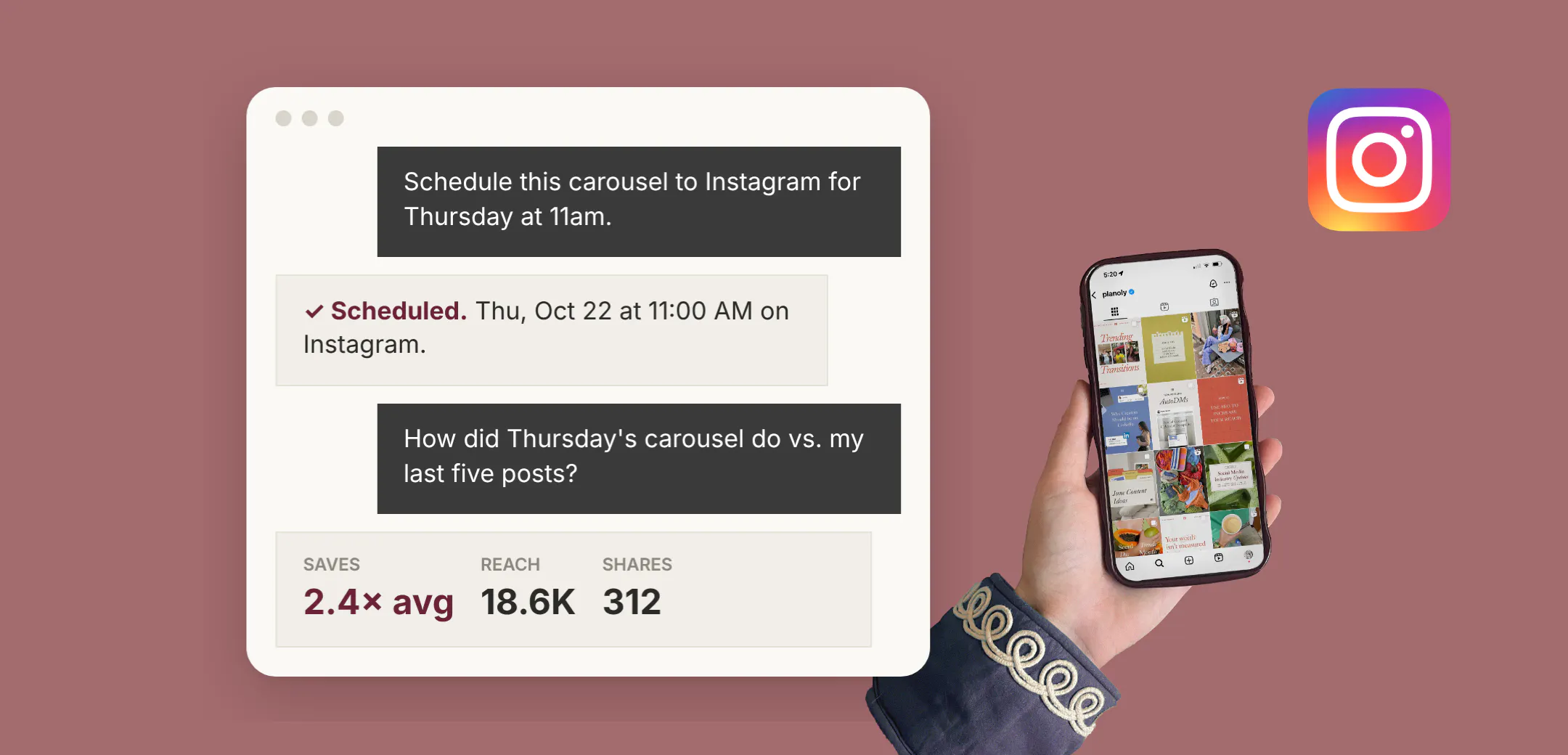
- Schedule the approved post. "Schedule this carousel and caption to Instagram for Thursday at 11am."
- Let it run. Give the post time to collect results before you judge it.
- Ask for the numbers. "How did Thursday's carousel do compared with my last five Instagram posts?"
- Decide the next move. "Saves were higher than usual. Draft two more carousel ideas on the same theme for my review."
Why it works: the review step happens where the planning happens, so performance data shapes the next post instead of sitting in a dashboard you check once a month. For more on that habit, see our guide to AI that uses your performance data.
If you want to try this loop step by step, the Claude walkthrough on claude.planoly.ai covers connecting your channels and running your first schedule-and-review prompts. Already set up with Claude? You can find Planoly directly in the Claude Connector Directory.
Frequently Asked Questions
Is there an Instagram MCP server that can post and read insights?
Yes. A scheduler's Claude connector, such as Planoly's, can schedule posts to a connected Instagram account and read back performance for that account through the same connection.
Can Claude read my Instagram insights?
Claude can read performance data for accounts you've connected and authorized through a connector. For Instagram, the Planoly connector returns views, reach, likes, comments, shares, saves, replies, reposts, Reel watch time and audience demographics, with up to 90 days of post data.
Is scraped Instagram data the same as my account analytics?
No. Scraper-style servers read public profile data and don't post. Your account analytics are first-party numbers for your own posts, available only through an authenticated connection.
Does the Planoly connector write my captions?
No. It schedules posts you've written and approved and reads how they performed. Claude can help you brainstorm in the chat, but you decide what gets published.
Why not use separate tools for publishing and analytics?
You can, but you'll be the bridge between them. One connection lets Claude match results to the exact posts it scheduled and plan the next round in the same conversation.